
LUMYMON adds some new features.
It is possible to customize them in a very simple way by opening the respective configuration file in the config folder.
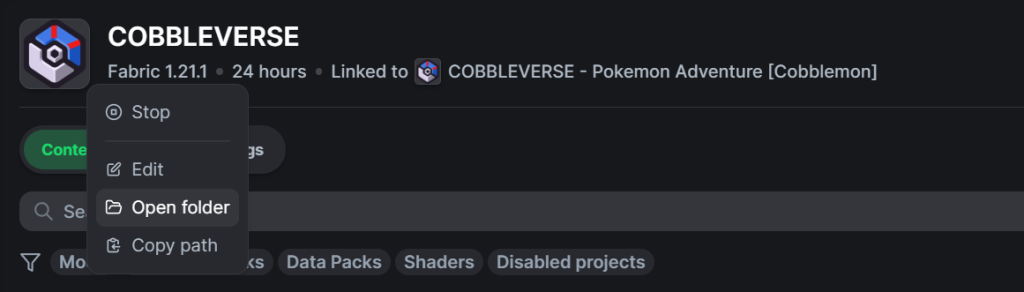
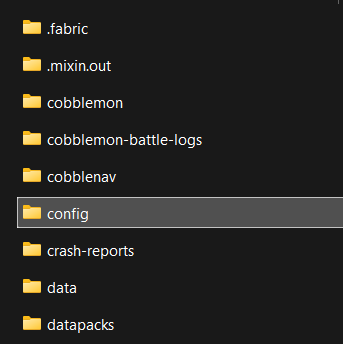
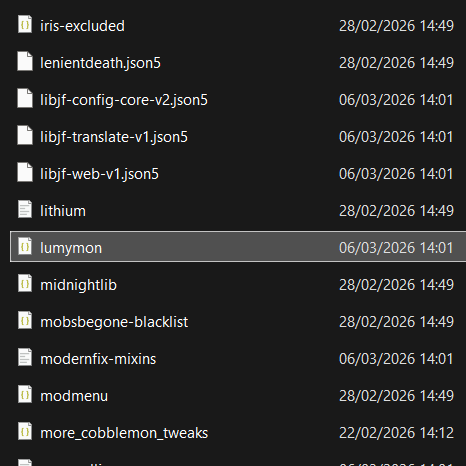
It will be enough to right-click on the modpack logo, both from CurseForge and Modrinth, then select “Open folder“. After that, look for the “config” folder and open the “lumymon.json” file
Configuration Settings Explained #
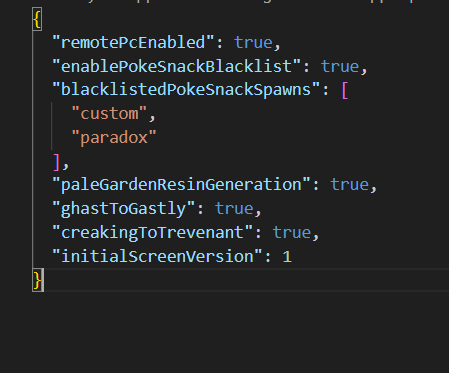
Once you have opened the JSON file, here is what you will find. Let’s break down each setting step by step:
remotePcEnabled: Set totrueto access your PC anywhere by pressing the “P” key. If set tofalse, you must craft a physical PCpaleGardenResinGeneration: Set totrueto enable automatic resin generation in the Pale Garden biome. This is essential for COBBLEVERSE since there are no Creaking mobs to drop it.creakingToTrevenant: Set totrueto spawn Trevenant instead of Creaking.ghastToGastly: Set totrueto transform Dried Ghast into a Gastly instead of an Happy Ghast.enablePokeSnackBlacklist: Set totrueto prevent PokeSnacks from working on the Pokémon listed. If you want to disable these restrictions and allow PokeSnacks to work on all Pokémon, simply set this tofalse.
How to Explore Lumymon Pokesnack Blacklists #
To view the existing Pokémon lists within the LumyMon mod, follow these steps:
- Go back to the same initial folder where you found the “config” folder (via “Open folder” in your launcher).
- Open the “mods” folder instead.
- Since mod files are in .jar format, they act like zipped folders. Make sure you have 7-Zip or WinRAR installed to open them correctly.
- Once you have opened the file, you will see a folder named “data”. Think of the “data” folder as the “brain” of the mod, where all the rules for the game are stored.
- To find the Pokémon lists, open these folders in order: “data” > “lumymon” > “poke_snack_blacklist”.
Inside this folder, you will find 5 distinct lists.
You can add the names of these lists to your config file to prevent the corresponding Pokémon from spawning or you can create your own custom list from scratch and place it inside a datapack following the exact same file path.


